

Resources for clearer decisions and coordinated work.
Explore published resources for operating cadence, delivery, workforce design, and daily practice. The Organizational Performance Assessment offers directional results that stay in your browser.
FREE TOOL
Free Daily Planner
Your day, from calendar to close, in eight short steps: name the frog and your three, put today’s actions on the clock around what is already booked, then print and close the day. Free with a verified email; your plans stay on your device and are erased after 72 hours.
CompassMentor™
For individual leaders and team members. The personal development companion: one platform, used inside CompassOS or as a standalone phone-first app.
- A personal development plan, assigned learning and a Daily Planner, one step at a time.
- Preparation for coaching and performance conversations; reflections stay private unless you share them.
- Included inside CompassOS, or standalone with an advisor who administers it in CompassWB.
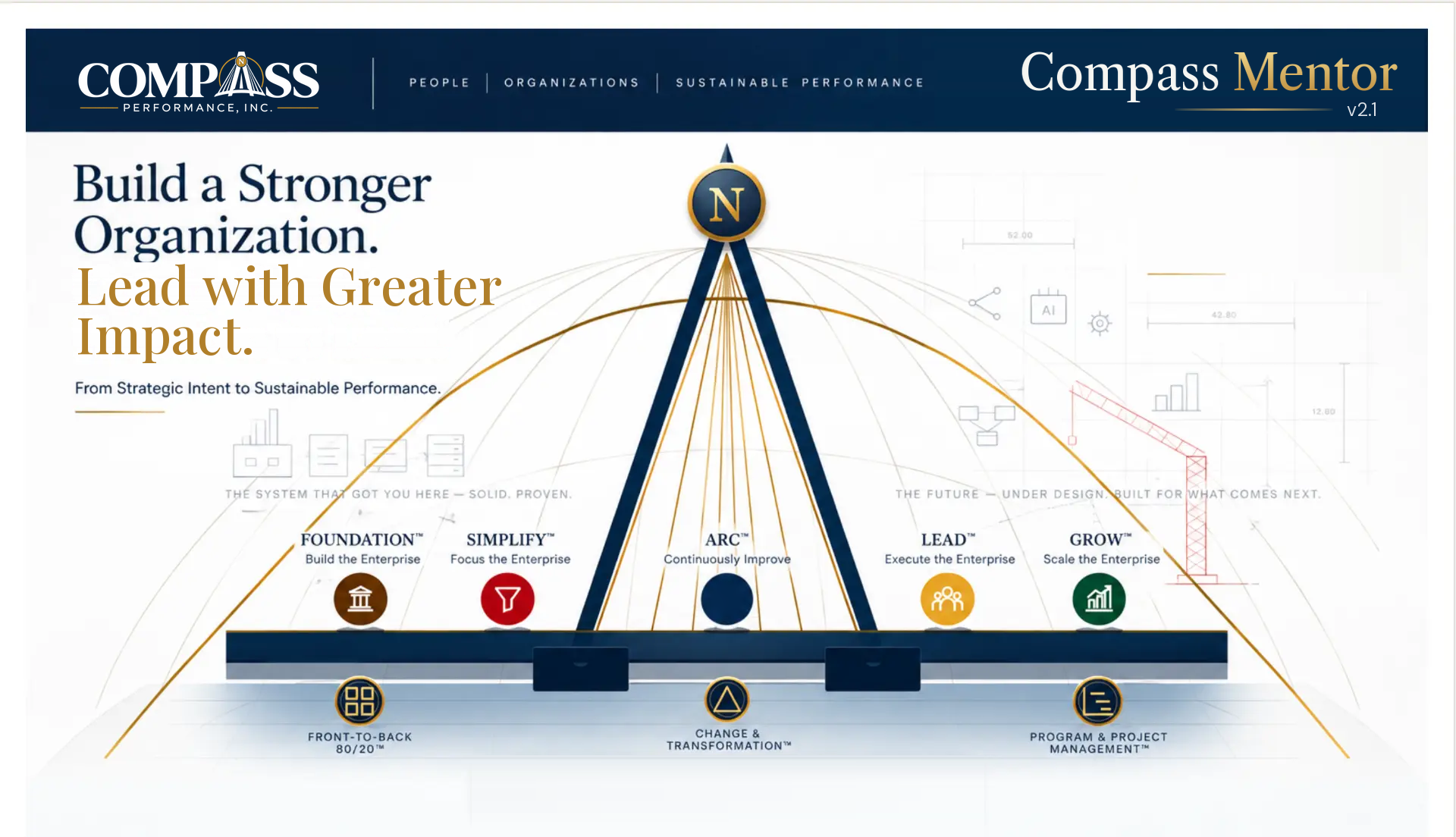

- Values, structure, and accountability. Connect leadership, culture, decision rights, and roles. Design a foundation that supports the strategy rather than depending on individual heroics.
- Remove waste and complexity. Examine value streams and distinguish value-added (VA), non-value-added (NVA), and necessary non-value-added (NVAR) work. Redesign complexity with intention.
- Analyze–Refine–Commit. ARC stands for Analyze, Refine, Commit: the feedback loop that returns learning to strategic focus. Revisit what is happening, adapt the approach, and commit to the next deliberate course of action.
- Leadership, ownership, and execution. Clarify accountability, build useful meeting cadences, and develop the leadership behaviors that turn decisions into coordinated action.
- Capability and sustainable growth. Identify the capabilities, organizational capacity, and leadership depth needed to support the next stage of growth.
- Find where value is created; informs Strategic Intent and SIMPLIFY. Front-to-Back 80/20 (FTB): focus the business end to end, from customers and products to operations: examine where value is created and where attention is diluted. Use an 80/20 lens to identify the few priorities that deserve disproportionate focus.
- Sponsorship, communication, readiness, and adoption. Carries the human side of change across every stage: sponsorship, communication, stakeholder readiness, and adoption.
- Scope, dependencies, decisions, and ownership. Gives work in any stage a clear delivery structure: scope, dependencies, decisions, ownership, and review cadence.
System simulation with synthetic data: sign-in, coaching replies and handbacks are simulated, and nothing is stored or sent. The working CompassMentor is a separate application, opened inside CompassOS or invited by an advisor.
- Video coming after final verificationThe CompassMentor overview is recorded after final verification of the application. The simulation is open now.
- Explore Interactive Simulation Synthetic data; sign-in, coaching replies and handbacks are simulated.
- Schedule a Conversation — opens the booking calendar in a new tabConfidential discovery conversation with Compass Performance.
Participant sign-in. By invitation only, with no self sign-up. CompassOS clients open CompassMentor from CompassOS; other participants are invited by their advisor.
- Values, structure, and accountability. Connect leadership, culture, decision rights, and roles. Design a foundation that supports the strategy rather than depending on individual heroics.
- Remove waste and complexity. Examine value streams and distinguish value-added (VA), non-value-added (NVA), and necessary non-value-added (NVAR) work. Redesign complexity with intention.
- Analyze–Refine–Commit. ARC stands for Analyze, Refine, Commit: the feedback loop that returns learning to strategic focus. Revisit what is happening, adapt the approach, and commit to the next deliberate course of action.
- Leadership, ownership, and execution. Clarify accountability, build useful meeting cadences, and develop the leadership behaviors that turn decisions into coordinated action.
- Capability and sustainable growth. Identify the capabilities, organizational capacity, and leadership depth needed to support the next stage of growth.
- Find where value is created; informs Strategic Intent and SIMPLIFY. Front-to-Back 80/20 (FTB): focus the business end to end, from customers and products to operations: examine where value is created and where attention is diluted. Use an 80/20 lens to identify the few priorities that deserve disproportionate focus.
- Sponsorship, communication, readiness, and adoption. Carries the human side of change across every stage: sponsorship, communication, stakeholder readiness, and adoption.
- Scope, dependencies, decisions, and ownership. Gives work in any stage a clear delivery structure: scope, dependencies, decisions, ownership, and review cadence.
Choose the experience that fits your seat.
- For leaders and their organizations
CompassOS™ — Client Delivery Simulation
The client-facing platform, shown with illustrative data: strategic intent, value-stream swim lanes and RASCI, project schedules, scorecards, cadence and the daily planner, adapted to the role you choose.
Public simulationExplore CompassOSWatch the CompassOS walkthrough Narrated video of the public simulation, with captions and a transcript.
Clean-Sheet Org Design simulation Redesign around the vital-few products and value streams: AS-IS baseline, TO-BE scenarios, grounded proposals, compare and approve.
- For independent advisors and coaches
CompassWB™ — Consultant Workbench for Advisors/Coaches
The advisor’s own operating system for running an independent practice: ideal clients, go-to-market and relationship development, the conversion pipeline, engagement management, finances and review cadence. It is a separate application from CompassOS, with its own data.
Public system simulationSynthetic data; actions and integrations are simulated. The working CompassWB is a separate application with its own sign-in.- Launch CompassWB System Simulation The interactive system: pipeline, engagement lifecycle, forums, scorecards, planner, finances and project controls.
- Explore CompassWB Guided overview with a fictional advisor (Alex Morgan): the practice’s digital thread, step by step.
- Watch the CompassWB walkthrough Narrated video of the system simulation, with captions and a transcript.
- For each person’s own development
CompassMentor™ — Personal Development, Two Ways
One personal-development platform: development plan, assigned learning, a coach, the daily planner, coaching and performance discussions, mental fitness and ARC. Organizations with CompassOS open it inside CompassOS; everyone else uses the standalone app with their advisor.
Public system simulationSynthetic data; sign-in, coaching replies and handbacks are simulated. Each section is labelled as working here, illustrative or a future capability.- Launch CompassMentor Simulation
- A · Inside CompassOS Opened from the CompassOS right-side menu with CompassOS sign-in and roles; included, no separate purchase.
- B · Standalone app Phone-first app for people without CompassOS; an authorized advisor administers it in CompassWB.
- Org Chart Setup for administrators Position-based or person-manager reporting, from an HRIS or a governed spreadsheet template.
For advisors, coaches and partnersCoaching anchored in real execution.
Run your own practice on the Consultant Workbench, and offer CompassOS to your clients as their ongoing operating platform. With the client’s consent, the two connect, so every coaching conversation starts from the goals, progress and evidence the client has agreed to share.
- Advisor / CoachYou, and your advisory mandate
- Interface 1Consultant WorkbenchYour own practice operating system
- Permissioned shared engagement dataConsent-based · client-scoped · revocable
- Agreed goals
- Measures
- Initiatives
- Project progress
- Decisions
- Evidence
- Performance
- Interface 2Client CompassOSThe client’s own operating platform
- Client Leadership TeamOwns the platform, the data and the access
Why it matters to your practice
- Anchored in executionCoaching starts from agreed goals, measures and evidence, not from memory between sessions.
- Continuity between sessionsYou see progress and decisions as they happen, within the scope the client grants.
- Lasting client relationshipsOngoing, visible value builds retention while the client keeps full autonomy.
How the client stays in control
- The client stays in controlThe client sets the scope and access, and can change or revoke it at any time.
- One client, one scopeNo unrestricted shared database; each connection covers one client, with no cross-client visibility.
- Least privilege, on the recordRole-based access to only what each person needs, with every access logged and auditable.
- Continuity without lock-inThe relationship lasts because the work is visible and useful, never because the client cannot leave.
- Available to explore today
- The public CompassOS simulation for client delivery, and a conceptual walkthrough of an advisor’s practice on the Consultant Workbench, with an illustrative engagement example. A public Workbench preview is not available yet.
- Proposed · conceptual
- The connected Workbench–CompassOS experience is a proposed design. No live connection, data sync, resale, pricing or commission arrangement is built or approved.
15 questions. Your organizational perspective.
- 15
- Questions
- 6
- Compass dimensions
- 3
- Focus priorities
An organizational performance reflection for CEOs, founders, operating partners, functional executives, leadership teams and advisors across six Compass dimensions, with your top three focus priorities. About 5 minutes; directional, self-reported results stay in your browser.
Courses
- Daily Practice: From Habit Design to an Intentional DayIn development11 guided modules: habit design, the frog, the law of three, the quarter-hour day and the printed sheet, with a working sheet inside the course.Open the course
80/20 online tools
Interactive tools that run in your browser; what you enter stays on your device.
- Quad & Quartile BuilderEnter what each market, customer, product or process earns and how hard it is to serve; see quartiles by contribution margin and a value-versus-complexity quad.Open Quad & Quartile Builder
- 80/20 CascadeRank candidate work from strategy to programs to the day, with a planning audit, reminders and a CSV export.Open 80/20 Cascade
- Time = Life CalculatorCalculate the working hours you have left at your current pace and what they mean in weeks of your life.Open Time = Life Calculator
- 80/20 Daily Time Management courseA guided course from the arithmetic of a life to the day you run tomorrow morning, including the Diamond Map.Open 80/20 Daily Time Management course
- Go-to-Market ArchitectureThe sales and marketing value stream allocated by Front to Back 80/20, with a live allocation desk.Open Go-to-Market Architecture (on the current Compass website, opens in a new tab)
- SIMPLIFY toolsThe SIMPLIFY discipline and the instruments aligned to it.Open SIMPLIFY tools (on the current Compass website, opens in a new tab)
Available public resources
- Daily Practice SheetsPublic resourcePublished daily practice resources.Read resource
- Operating Cadence Install — Plan, Measures, Actions, MeetingsPublic resourceExecutive and strategy execution method page.Read resource
- Delivery Architecture — Strategy to Daily WorkPublic resourceStrategy-to-execution architecture page.Read resource
- Workforce ArchitecturePublic resourcePublic workforce architecture offering page.Read resource
Toolset overviews
- WorkbenchOverviewA consultant workbench for Compass engagements. Details are shared in conversation.
Start with a confidential conversation about what you want to achieve
Opens the approved calendar in a new tab. An appointment is confirmed only by the calendar provider.